Desktop GUI (bmc-gui)
A lightweight (~4.8 MB stripped), GPU-accelerated native desktop wallet and node console for
macOS Apple Silicon, Linux x86-64, and Windows x86-64.
Designed Watch-Only + Hardware Signer first (BIP174/BIP370 PSBT, USB HWI signtx, air-gapped .psbt files & QR)
over local .cookie or remote JSON-RPC.
bmcbitcoind and bmc-gui never touch private keys. You import account-level
output descriptors (wpkh([mfp/84h/0h/0h]xpub.../0/*), Taproot tr(...), or multisig),
verify receive addresses directly on your hardware device screen via walletdisplayaddress,
and sign transactions via USB HWI (signtx) or air-gapped .psbt / QR transfer.
Hot-wallet private key custody remains experimental until Argon2id+AEAD storage and an independent human cryptographic audit.
All screenshots below are real captures of native bmc-gui v0.2.0 populated with synthetic BIP84/BIP86 test-vector addresses and RFC 5737 documentation peer IPs. Click any screenshot to inspect full-size.
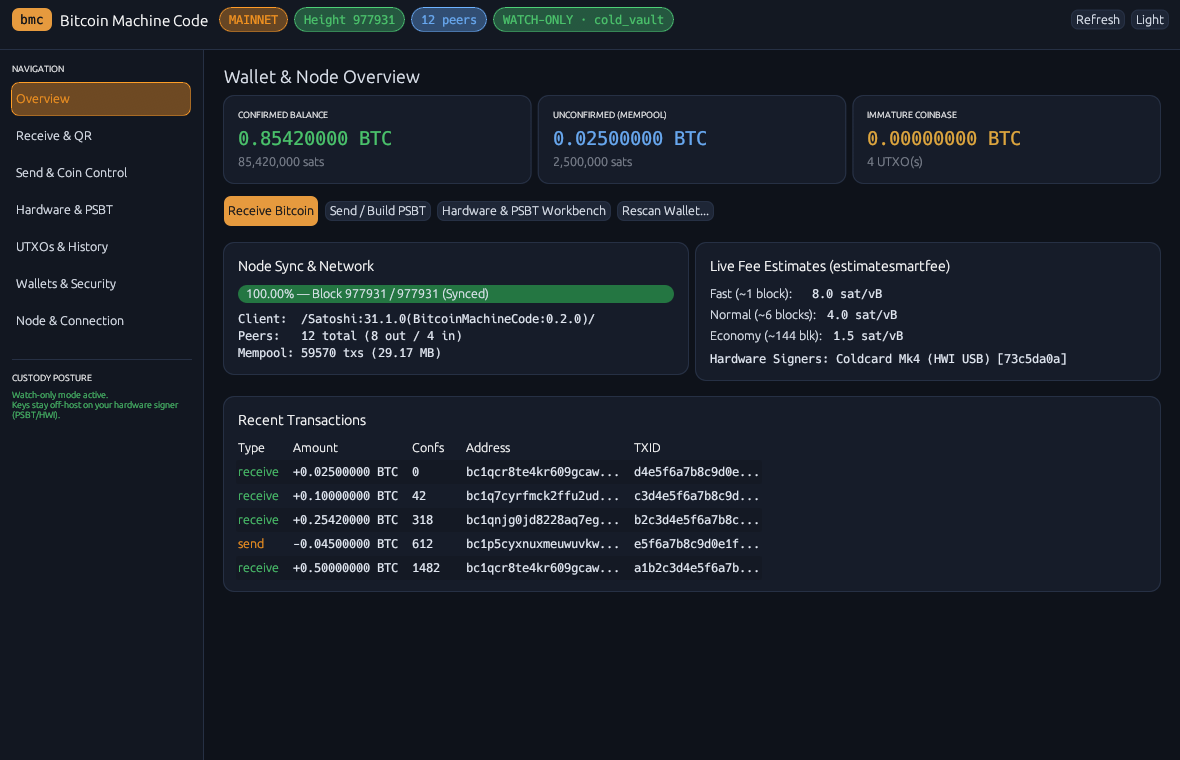
1. Wallet & Node Overview
At-a-glance confirmed, unconfirmed (mempool), and immature balances in BTC and sats, live sync progress bar,
estimatesmartfee fee targets (Fast / Normal / Economy), detected USB hardware signers, and recent transaction history.
Topbar status pills keep network, block height, peer count, and custody posture (WATCH-ONLY vs HOT WALLET) visible on every screen.
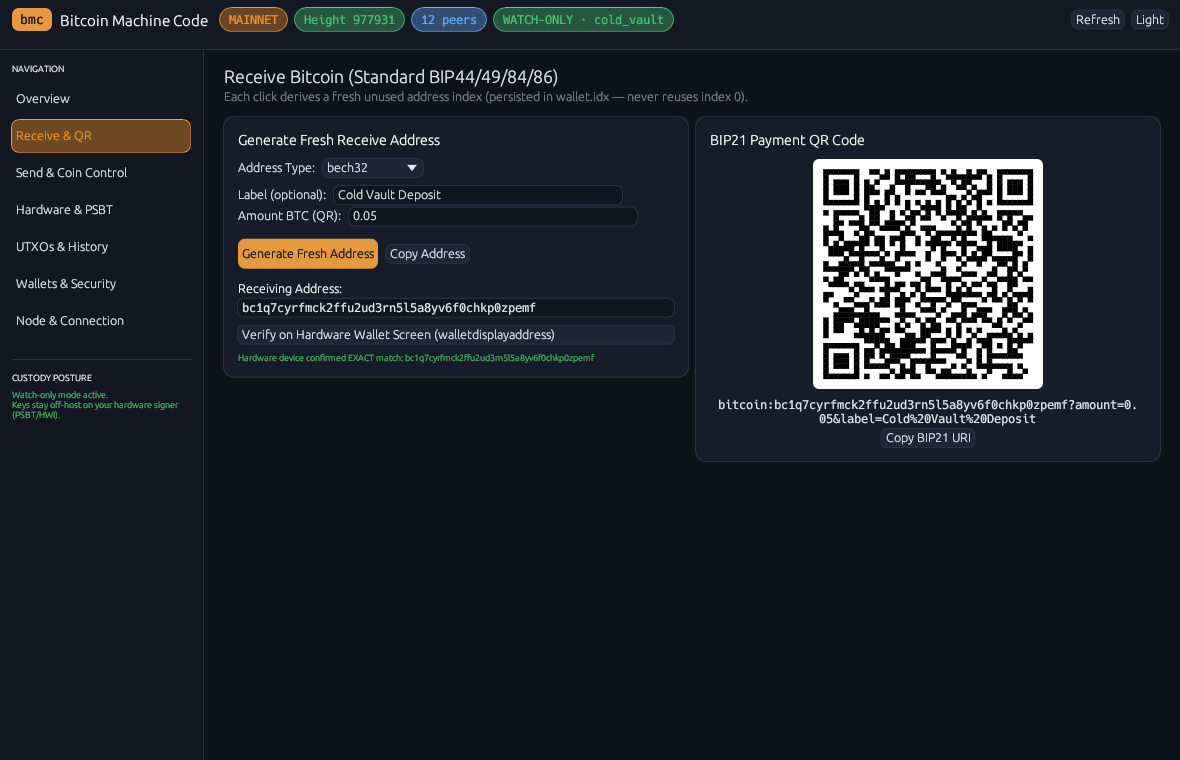
2. Receive & BIP21 QR Code
Derives fresh, non-reusing addresses along standard BIP44 / BIP49 / BIP84 / BIP86 paths
(persisted per-type in wallet.idx), renders crisp native BIP21 payment QR codes with optional amount and label,
and supports one-click hardware screen verification via walletdisplayaddress.
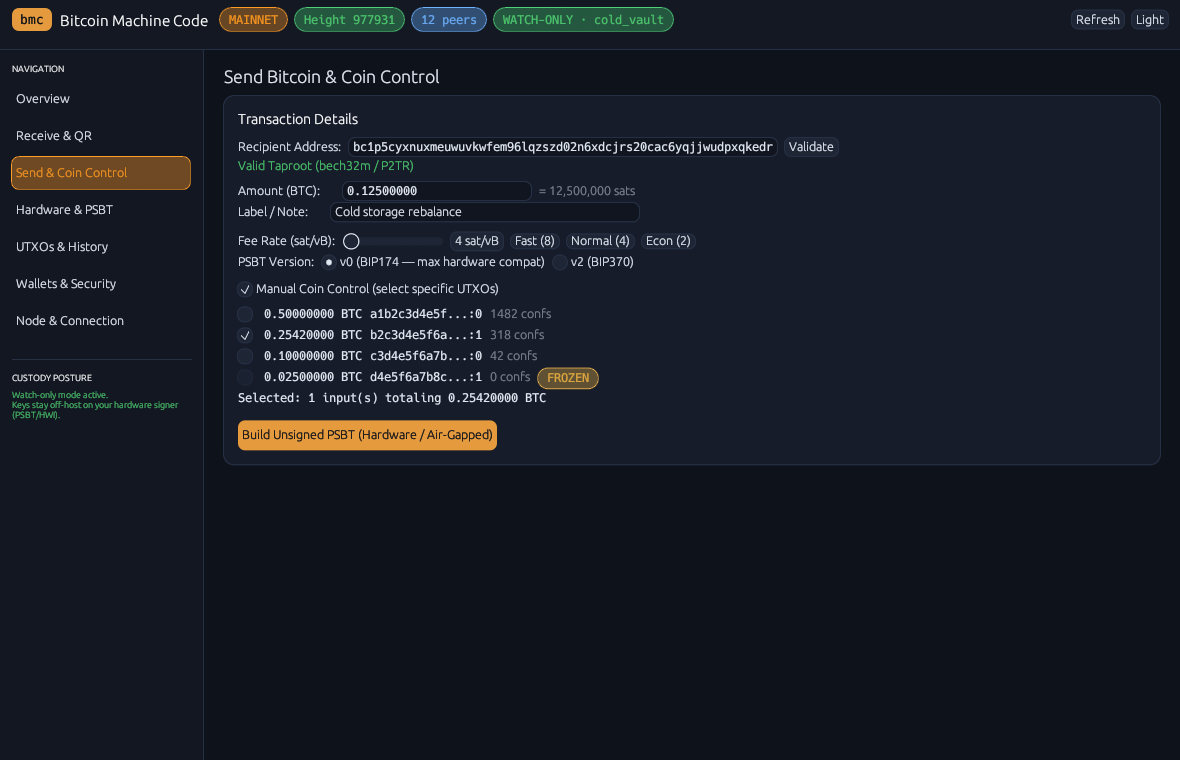
3. Send & Manual Coin Control
Live recipient address validation (Taproot bech32m, Native SegWit bech32, Nested P2SH, Legacy),
estimatesmartfee presets, BIP174 PSBT v0 / BIP370 PSBT v2 selection, and manual UTXO Coin Control respecting frozen coins (lockunspent).
Watch-only wallets build unsigned PSBTs directly into the Hardware & PSBT Workbench.
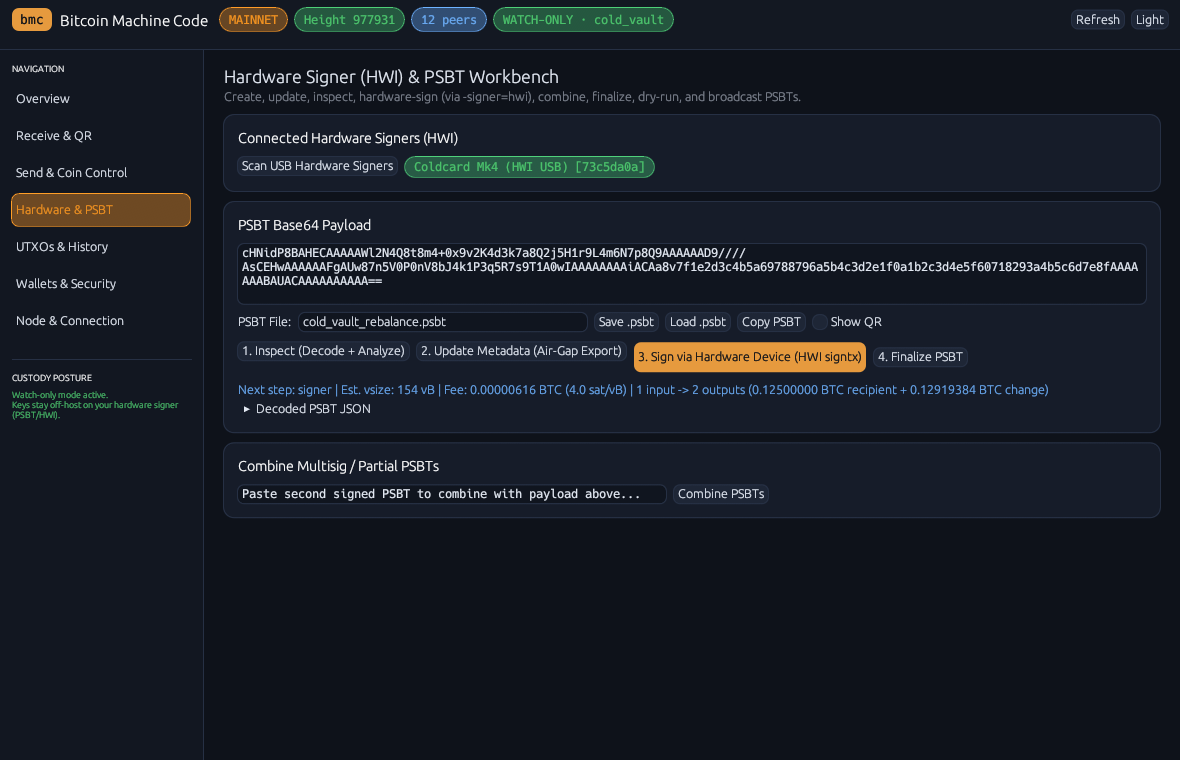
4. Hardware Signer (HWI) & PSBT Workbench
Full end-to-end PSBT pipeline: scan USB signers via enumeratesigners, inspect and decode payloads
(decodepsbt + analyzepsbt), update BIP32 derivation metadata for air-gapped signers,
save/load .psbt files or display QR, sign via USB HWI (walletprocesspsbt → HWI signtx),
combine multisig partial PSBTs, finalize, dry-run with testmempoolaccept, and broadcast.
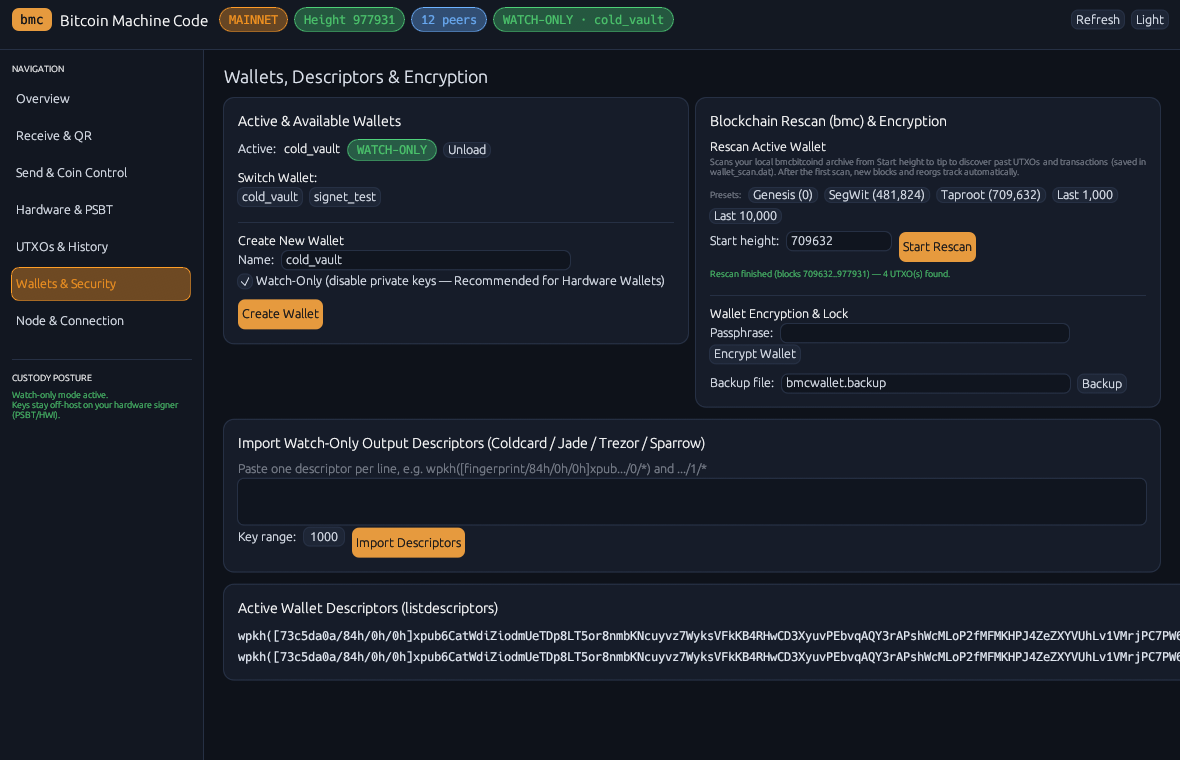
5. Wallets, Descriptors & Blockchain Rescan
Create watch-only vaults, import account-level output descriptors, encrypt/unlock/backup wallets, and run
rescanblockchain with 1-click height presets (Genesis (0), SegWit (481,824),
Taproot (709,632), Last 1,000, or Last 10,000 blocks) and live scan status.
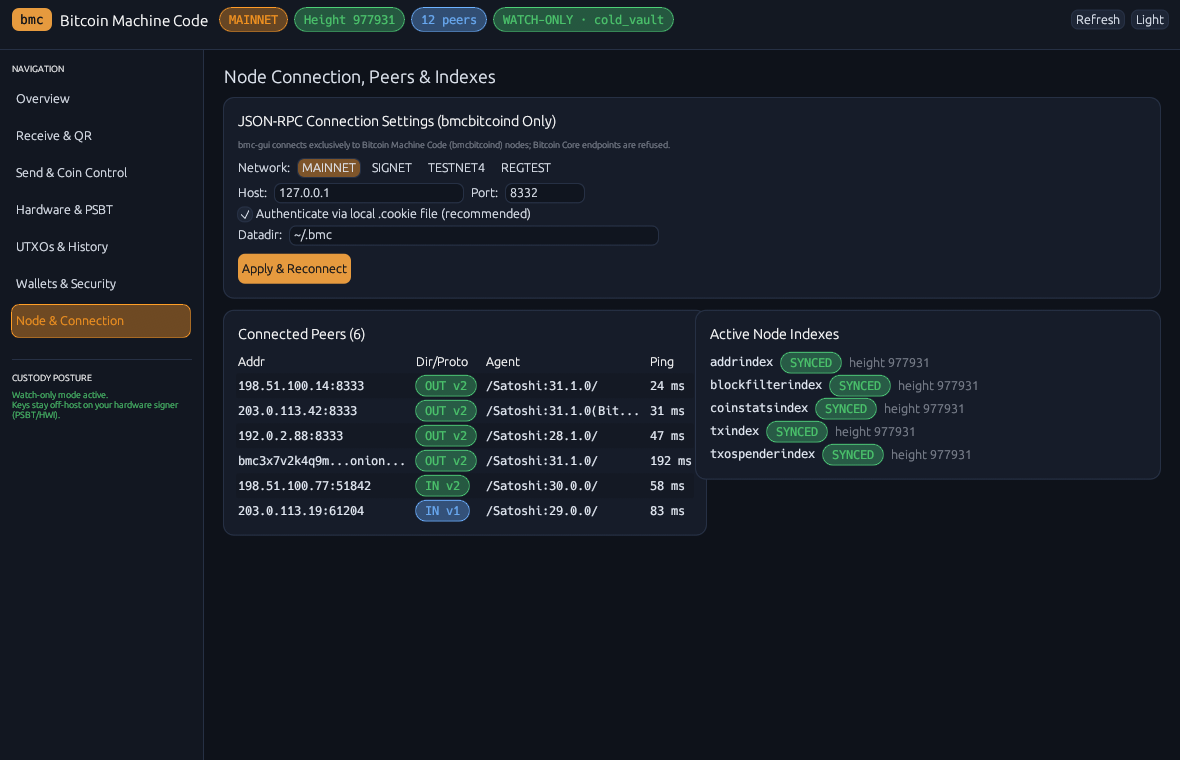
6. Node Connection (bmcbitcoind Only), Peers & Indexes
bmc-gui verifies getnetworkinfo before issuing any wallet calls and connects
exclusively to Bitcoin Machine Code (bmcbitcoind) nodes (Bitcoin Core endpoints are refused).
Configure local .cookie auto-discovery or remote host/port/user/password RPC credentials
(saved automatically to ~/.bmc/gui_config.json without persisting plaintext passwords),
inspect live inbound/outbound BIP324 v2 encrypted peers, and monitor all 5 zero-delay indexes
(addrindex, blockfilterindex, coinstatsindex, txindex, txospenderindex).
Install, Build & Connect
Option A: Prebuilt v0.2.1 Release Binary
Download your platform archive from the v0.2.1 release page
and extract bmc-gui (or bmc-gui.exe on Windows).
Option B: Build From Source (Rust 1.75+)
cd gui
cargo build --release
./target/release/bmc-gui
CLI Flags & Saved Connection Config
# Auto-discovers ~/.bmc/main/.cookie on 127.0.0.1:8332 (or saved ~/.bmc/gui_config.json)
./bmc-gui

# Point to a custom datadir or port (clicking "Apply & Reconnect" persists host/port/datadir)
./bmc-gui --datadir=/path/to/datadir --rpcport=8332

# Connect to Signet, Testnet4, or Regtest
./bmc-gui --signet --datadir=/path/to/datadir
./bmc-gui --testnet4 --datadir=/path/to/datadir
./bmc-gui --regtest --datadir=/path/to/datadir